
Right after enabling App Protection Policies (MAM) for iOS, one user suddenly couldn’t open any protected company data in Edge. Every time the user signed in with his work profile, the account appeared for a second, then vanished. Outlook and Teams still worked fine. Conditional Access wasn’t the issue. Something inside Edge itself was forcing a wipe.
The issue
The behavior is immediate and perfectly repeatable. The user signs in with the work account, the Edge profile appears for a moment, and then it disappears again. Within seconds the browser returns to a signed-out state as if the sign in never happened. There is no visible error. No message explaining what went wrong. The account simply vanishes.

That lack of feedback makes the situation confusing. From the outside nothing else appears to be failing. The user can authenticate without problems. Outlook and Teams continue to function normally. Conditional Access does not block the session, and the authentication flow completes successfully. Everything around the sign in process looks healthy.
Which makes Edge look like the only broken component. The important detail is the timing of the reset. The account is accepted first. Edge briefly shows the signed in profile, which means authentication itself succeeded. Only after that moment does the account disappear.
And it happens every single time.
- Sign in.
- The profile appears.
- The profile is removed.
Reinstalling the application does not change the behavior. Clearing the app from the device and installing it again produces the exact same result. The loop continues immediately after the next sign in.
That consistency is the clue. When the wipe happens directly after authentication and repeats with identical timing, the trigger usually comes from the App Protection SDK evaluating the identity state rather than from the sign in process itself.
Digging Deeper: The MAM Diagnostic Log
The next step was verifying what the Intune App Protection SDK actually believed about the device state. For that we exported the MAM diagnostic log from the affected iPhone using the built in export option inside Microsoft Edge.
This diagnostic log is generated directly by the Intune App Protection SDK that runs inside the managed application. It is not just a simple error report. The log contains the complete local state the SDK maintains for identity registration, policy assignment, token validation, and protection status.

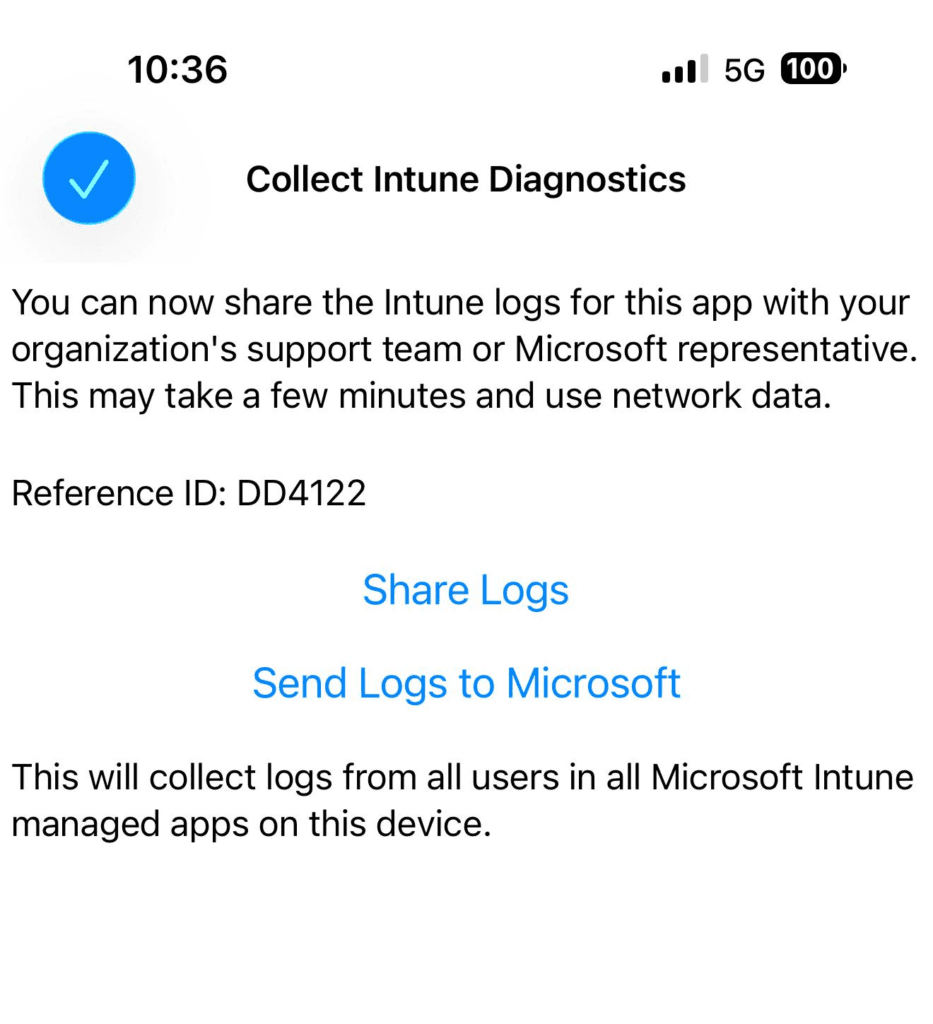
Each identity the SDK has ever seen is tracked here. For every identity the log records information such as
• the internal identity identifier
• enrollment state
• policy source and assignment status
• timestamps of registration and policy evaluation
• failures encountered during registration or token validation
In other words, this file shows the exact view the MAM engine has of the device and the identities interacting with the application.
That distinction matters.
App Protection Policies are enforced per identity inside the application. The SDK does not simply apply a policy to a device. Instead it evaluates whether a signed in identity is targeted by a policy and whether that identity completed the required registration process. If that registration fails or becomes inconsistent, the SDK enforces protective actions such as blocking access or performing a wipe.
The full policy flow behind that process is explained in more detail in the section “How App Protection Policy registration works” of my article
Because the diagnostic log reflects the SDK’s internal identity state, it becomes the most reliable place to understand why an application suddenly decides to block access or wipe its protected data.
And in this case, that log immediately exposed something unexpected. Instead of one identity associated with the user session, the SDK reported two.
Looking Inside the MAM Log
The log clearly revealed that two separate identities were present on the device. One identity was healthy and correctly associated with the active policy. The other identity was incomplete and failed validation.
Valid identity
Section: CMARScrubbedOID:d91a...EnrollmentCompleted: truePolicySource: MAM
This entry represented the correct work account. The identity completed the full enrollment process and the SDK successfully associated it with the App Protection Policy. From the SDK perspective, this identity was valid, registered, and fully governed by the expected MAM configuration.
Broken identity
Section: CMARScrubbedOID:10e6...EnrollmentCompleted: falsePolicySource: None
The second identity told a different story. Enrollment never completed and no policy source was attached to it. In other words, the SDK recognized the identity but could not associate it with a valid MAM policy or a completed registration state.
This type of entry typically appears when an identity token remains on the device after a change in the account context. Examples include:
• a user signing in with a different UPN
• a tenant switch
• a previously cached authentication session
• a stale token that survived app reinstall or account removal
Because the SDK still sees the identity but cannot validate it, the state becomes inconsistent.
The global state section made this even clearer.
RegisteredAccountsFailed:
  CMARScrubbedOID:10e6...RegisteredAccountsNotTargeted:
  CMARScrubbedOID:10e6...
Two signals appear here.
First, the identity is listed under RegisteredAccountsFailed. This means the SDK attempted to register or validate the identity but could not complete the process successfully.
Second, the same identity appears under RegisteredAccountsNotTargeted. That indicates no active App Protection Policy applies to it. From the SDK’s perspective, the identity exists locally but is outside the scope of policy enforcement.
This combination is important.
The SDK is now observing two identities for the same application environment:
• one identity that is fully enrolled and targeted by MAM
• one identity that failed registration and is not targeted by policy
When this condition appears, the SDK treats the state as potentially unsafe. A device that holds both a valid managed identity and a failed unmanaged identity creates ambiguity about which identity owns the protected data.
To prevent data leakage or cross identity access, the SDK resolves the inconsistency by triggering a local wipe.
In other words, the wipe is not caused by the valid identity. It is triggered because the SDK detects a failed identity alongside a working one and refuses to operate in that mixed state. And that’s exactly what triggers a local wipe.
Why It Happens
The behavior starts to make sense once you understand how the Intune App Protection SDK manages identities.
The SDK does not treat each application as an isolated environment. Instead, all managed apps on the device share a common identity store maintained by the Intune MAM framework. When a user signs in to a managed application such as Edge, that identity becomes part of this shared container and can be evaluated by the SDK across all protected apps.
This identity model is a core part of how App Protection Policies operate. Policies are not enforced per device but per identity within the application container. The SDK continuously evaluates whether those identities are correctly registered and targeted by policy. The mechanics behind this flow are described in more detail in the section “How App Protection Policy registration works” of my article
From the SDK perspective every identity in the container must satisfy two conditions:
The identity must complete the MAM enrollment process
EnrollmentCompleted: true
The identity must be targeted by an App Protection Policy
PolicySource: MAM
If the SDK encounters an identity that fails either condition, it treats that identity as unmanaged.
Two situations immediately raise a red flag:
EnrollmentCompleted: false
The identity started registration but never finished it.
PolicySource: None
The identity exists locally but is not targeted by any App Protection Policy.
At that point the SDK cannot guarantee that all data inside the application container is protected by policy. Because managed applications store data per identity, an incomplete or unmanaged identity introduces uncertainty about which data belongs to which protection context.
Rather than risking that protected data becomes accessible through an unmanaged identity, the SDK takes a defensive approach.
It assumes the container may contain data associated with an unmanaged identity and performs a local wipe of the managed application storage.
In the case of Microsoft Edge this wipe clears the entire managed profile. All signed in accounts disappear because the application container is reset to a clean state.
The problem did not stop there.
After the wipe, Edge launched again and the user signed in once more. During the next policy evaluation the same broken identity identifier appeared in the SDK state. Because the identity was still considered invalid, the SDK repeated the same safety check and triggered another wipe.
The result is a loop that looks like this:
- Sign in
- SDK evaluates identity state
- Broken identity detected
- Container wipe triggered
- Application restarts
Then the cycle begins again.
From the user perspective this appears as an endless sign in → account disappears → sign in again loop. From the SDK perspective it is simply enforcing the same protection rule over and over because the identity state never becomes valid.
What We Tried
The first troubleshooting steps were the predictable ones. When an application keeps resetting its state, the assumption is usually that something local is corrupted.
So we started by resetting the application environment completely.
Removing Edge
Microsoft Edge was removed from the device entirely. The app was deleted, the device was rebooted to clear any active sessions, and Edge was installed again from the App Store. After launching the fresh installation, the user signed in again with the work account.
The behavior returned immediately.
Edge accepted the credentials, the account briefly appeared in the profile list, and within seconds the account disappeared again. No visible error message. Just the account being silently removed. At this point it was clear that reinstalling the application did not remove whatever state was triggering the wipe.
Verifying Conditional Access and configuration
The next step was verifying whether the sign in process was being interrupted by policy enforcement.
Conditional Access policies were reviewed first. The device was not blocked, and no policies were forcing a sign in failure or requiring a device compliance state that the phone could not satisfy. App Protection Policy assignments were also checked. The user was correctly targeted by the expected MAM policy and the application configuration looked exactly as intended.
From a policy perspective nothing stood out. No misconfiguration, no conflicting assignments, and no conditions that should immediately invalidate the user session.
Everything looked normal.
Which meant the problem was likely not coming from Conditional Access or policy targeting. Something else was causing the SDK to invalidate the identity locally and trigger the wipe behavior.
The Fix That Actually Worked
The breakthrough came from looking at the identity state inside Microsoft Edge itself. On a desktop version of Edge there is an internal diagnostics page available at:
That page exposes Edge’s internal sign in data, including cached identities, token information, and refresh state details. It gives you a much clearer view of what Edge still remembers in the background, even when the visible account state looks normal. This page is available on mobile devices as well.
The important detail was at the bottom of that page. There is a button labeled Remove all accounts.
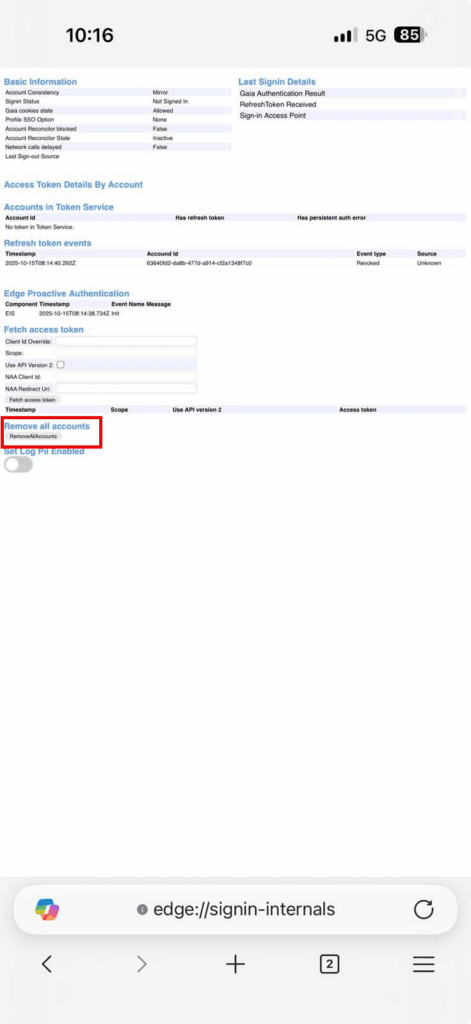
That action clears the cached Edge sign in state tied to the profile. In practice, it removes the stored accounts and the stale identity references that were still hanging around in the background. That included the broken OID which kept showing up in the MAM diagnostic log.
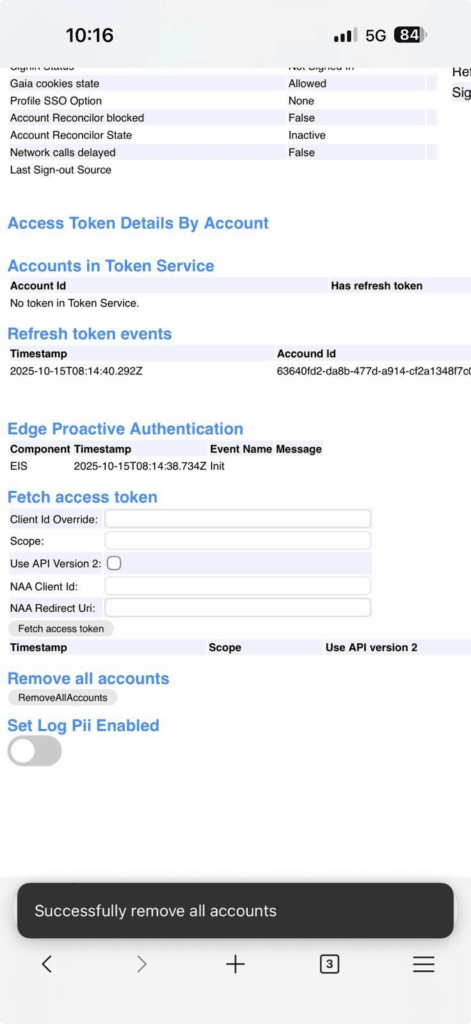
That turned out to be the actual fix.
After using Remove all accounts, the next sign in on iOS started from a clean identity state. The Intune SDK registered only one identity, enrollment completed successfully, and the broken OID did not return.
The MAM log now showed exactly what you would expect in a healthy situation:
EnrollmentCompleted: true
Only one valid OID remained, the SDK no longer detected a conflicting identity, and the wipe behavior stopped.
That is why the issue disappeared permanently. The problem was not the Edge app installation itself, but the stale sign in state attached to the Edge profile. Once that identity cache was cleared properly, iOS could create a fresh and valid MAM registration without falling back into the same loop.

What to Check Next Time
If Edge on iOS adds and removes the work account right after sign-in:
- Export
IntuneMAMDiagnosticInfo.txtand check for:- More than one Section: entry
- Any
EnrollmentCompleted: falseorPolicySource: None RegisteredAccountsFailedorRegisteredAccountsNotTargetedlists
- Confirm Conditional Access didn’t block the sign-in.
- Run
edge://signin-internalson desktop and click Remove all accounts. - Sign back in with the correct work account.
Conclusion
Sometimes the problem is not the device, the application, or even the policy configuration. The issue can come from an identity that never finished its App Protection registration.
In this case the root cause was a stale identity that remained in the Intune SDK identity store. The identity existed locally but never completed the MAM enrollment process. Because of that incomplete state, the SDK treated it as unmanaged. Every time the user signed in, the SDK detected the same leftover OID alongside the valid identity.
From the SDK perspective that situation is unsafe. When a managed identity and an incomplete identity exist at the same time, the SDK cannot guarantee that all data inside the application container is properly protected. To avoid potential data leakage, it resets the managed container.
That is why Edge kept removing the account immediately after sign in. The login itself succeeded, but the SDK wiped the managed profile right afterward.
Reinstalling the application did not change anything. Deleting Edge removed the app, but it did not remove the stale identity associated with the user’s Edge profile. When the user signed in again, the same broken identity reappeared and the SDK repeated the wipe.
The actual fix was clearing the cached identities from Edge itself.
Using the internal page edge://signin-internals on a desktop version of Edge, the Remove all accounts option removes the stored identities and tokens tied to the Edge profile. Once that identity cache was cleared, the stale OID disappeared.
After that single action, the next sign in on iOS created a completely fresh MAM registration. The SDK detected only one identity, enrollment completed normally, and Edge finally remained signed in.